The invoice details page allows the customer to securely enter their contact details and their payment information.
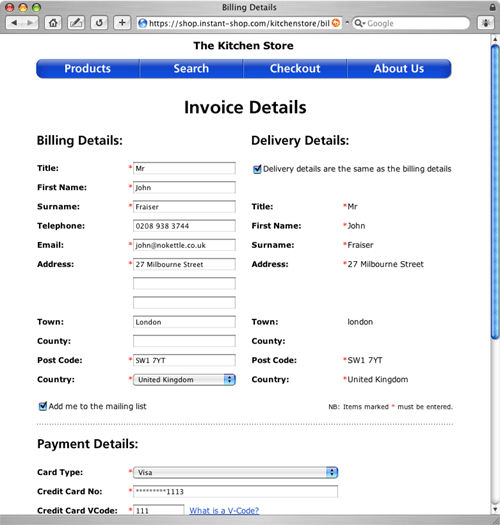
By default Instant-Shop will ask the customer for their billing details and their delivery details. If the 'Delivery details are the same as the billing details' checkbox is ticked the billing details will automatically be copied into the delivery details as they are entered. If the checkbox is unticked the customer can enter a different billing address.
Pro only: Instant-Shop will automatically create an account for all customers placing orders. These will be downloaded along with the order. The Invoice Details page includes a tick box asking them if they want to be added to the mailing list or not.
Extra fields can be enabled by selecting options in the Invoice Details screen.
The accepted payment details can be configured in the Credit Card screen. If the payment details are taken by a credit card clearing company then Instant-Shop will not collect the credit card details for security reasons. Once the customer clicks 'Send Order', Instant-Shop will redirect the customer on to the chosen credit card clearing company for them to validate the credit card before returning the customer to the Order Confirmation page as usual.
The form is also validated before the form is accepted: Fields marked with a red asterisk must be entered. The email address must be correctly formatted. If a United Kingdom address is entered it must be entered with a valid post code. The credit card number must be a valid credit card number. If it is a Switch card the Switch issue number and date must be entered.
When the user has entered all their details the customer can click 'Send Order' they will be taken to the Order Confirmation page.
Instant-Shop™ User Manual