The Invoice Details page is the page on the web site that collects the customers details such as address and credit card details. It can be customised to meet your requirements.
To change the Invoice Details page select 'Invoice Details' from the 'Options' menu from the Product Database screen.
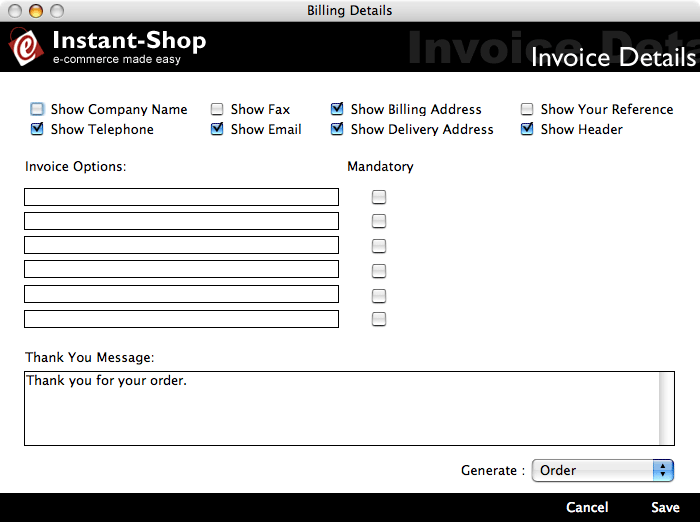
Show Company Name
The 'Show Company Name' checkbox turns on the company name field on the Invoice Details web page. Use this if your are setting up a site that is primarily selling to other businesses.
Show Telephone
The 'Show Telephone' checkbox turns on the telephone field on the Invoice Details web page. This option should normally be on as you will need this information to get in touch with the customer if there is a problem with their order.
Show Fax
The 'Show Fax' checkbox turns on the telephone field on the Invoice Details web page. Use this if your are setting up a site that is primarily selling to other businesses.
Show Email
The 'Show Email' checkbox turns on the telephone field on the Invoice Details web page. This option should normally be on as you will need this information to get in touch with the customer if there is a problem with their order.
Show Billing Address
The 'Show Billing Address' checkbox turns on the billing address field on the Invoice Details web page. This option should normally be on as you will need the address of the customer to take their credit card payment.
It can be useful to turn off the billing address when you are using Instant-Shop to generate enquiries and therefore do not need to record billing information.
Show Delivery Address
The 'Show Delivery Address' checkbox turns on the delivery address field on the Invoice Details web page. This option should normally be on as you will need know where to deliver the goods.
Show Your Reference
The 'Show Your Reference' checkbox turns on the your reference field on the Invoice Details web page. Use this if your are setting up a site that is primarily selling to other businesses or for producing quotations.
Invoice Options
'Invoice Options' are extra fields that are added to the Invoice Details web page to collect extra information pertaining to the order eg 'Delivery Time am/pm'. They are placed immediately after the billing and delivery address. The fields provided are just straight forward text entry boxes.
These fields can also be used for collecting Marketing data such as 'Where did you hear about us?' but Pro users can also take advantage of the Marketing Questions feature. Up to 6 Invoice Option fields can be specified.
Each Invoice Option can be marked as mandatory or not.
To remove an Invoice Option simply clear the text out in the field.
Thank You Message
The 'Thank You message' is displayed at the top of the Order Confirmation page. It is the text that will thank your customer for placing their order. It defaults to 'Thank you for your order'.
Generate
The 'Generate' popup menu tells Instant-Shop the type of document that the shop should produced once the order has been placed. Choices are: 'Invoice', 'Order', 'Enquiry' and 'Quotation'. Once the document type has been selected all references to the document are changed on the Order Confirmation page accordingly. Eg if 'Quotation' is selected then Instant-Shop will produce a Quotation with Quotation numbers etc.
Instant-Shop™ User Manual