Instant-Shop allows multiple bands of VAT. By default it will create three bands for standard rate at 17.5%, reduced rate at 5% and zero rate at 0%. New sales tax bands can also be added. The sales tax for products is added in the prices tab on the product entry screens.
Instant-Shop calculates VAT for UK and EEC countries and will not apply VAT if the customer is outside the VAT. Instant-Shop also handles tax free zones like the Channel Islands. The VAT is calculated on the checkout.
To change the sales tax bands select 'Sales Tax' on the 'Options' menu
from the Product Database screen.
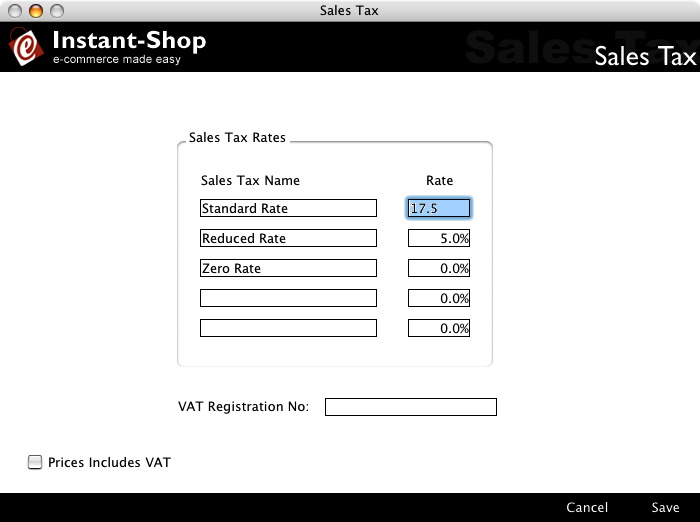
Sales Tax Rates
Enter your VAT bands and rates here. If the rate changes it will automatically by applied to all the products in the database.
To remove a sales tax rate simply remove all the text from the description and set the rate to 0%.
VAT Registration No
If you have a VAT registration number you can enter it here. It will appear on the order confirmation page and on the order confirmation email.
Prices Include VAT
If you are selling to consumers then ensure that this box is ticked. This will indicate that your product prices have been entered with VAT already added on. The amount of VAT paid will still be shown on the checkout
If you are selling to other businesses then this option can be unticked. This will indicate that your product prices have been entered without VAT. The amount of VAT is calculated and added on to the order total.
Instant-Shop™ User Manual