The price of the product can be affected by the VAT and a discount.
VAT rates can be customisable. Some products have different VAT rates from the standard rate. VAT rates can be customised and the VAT rate for the product can be selected.
The discount is shown on both the product list and more information page in the following manner.

To add a discount or set a VAT rate click on the 'Prices' tab within the Product Entry record.
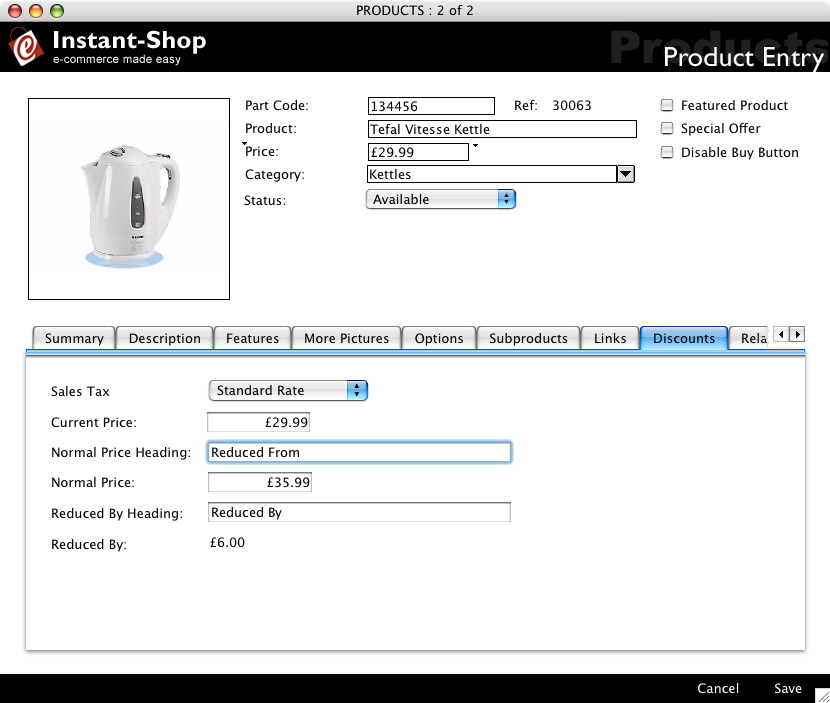
Sales Tax
The Sales Tax or VAT rate will default to Standard Rate. If your product has a different VAT rate select it from the menu. The VAT will automatically be calculated in the checkout. Different levels of VAT can be added in the 'Sales Tax' screen in the 'Options' menu.
Tip: You can enter your prices with or without VAT depending on whether you are selling to consumers or to other businesses. Enter your VAT settings in the Sales Tax screen.
Current Price
The current price is the main price of the product and what the item will be sold for. Changing the current price will affect the price for the product.
Normal Price
The 'Normal Price' is the price that the product used to be sold for before the discount. The 'Normal Price' field will not be available if subproducts have been added.
Normal Price Heading
The 'Normal Price Heading' will be displayed if a different price is entered into the current price from the normal price. This will default to 'Reduced From:'. The 'Normal Price Heading' field will not be available if subproducts have been added.
Reduced By
The 'Reduced By' field is the difference between the normal price and the current price. It is not enterable. The 'Reduced By' field will not be available if subproducts have been added.
Reduced By Heading
The 'Reduced By Heading' will be displayed if there is a price reduction. The 'Reduced By Heading' field will not be available if subproducts have been added.
Instant-Shop™ User Manual