The Instant-Shop site is fully indexable by the search engines. The search engines can index all the products on the site. Every page can carry keywords.
Tip: Keywords are optional but are highly recommended. To help further increase the relevancy of each product individual keywords should be entered.
To enter the site's keywords select 'Keywords' on the 'Options' menu
from the Product Database screen.
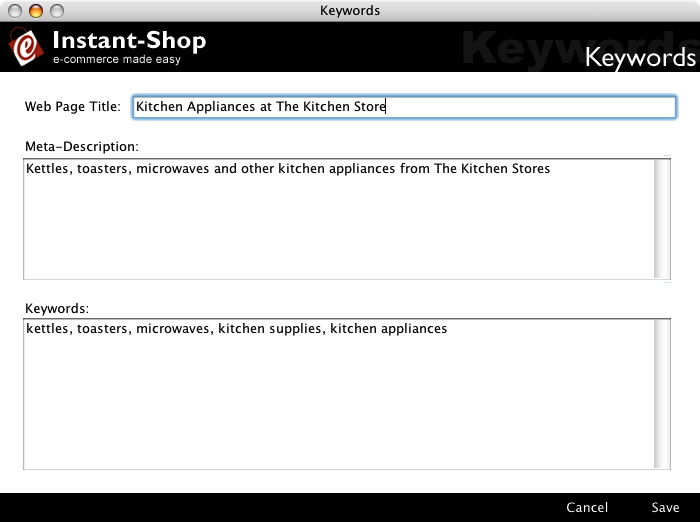
Web Page Title
The web page title is the name of the site when a page is displayed. This is one of the most important factors for search engines like Google. If no web page title is specified, Instant-Shop will automatically use the product name, product category and the company name in the title where applicable.
Tip: Keep your title short and to the point. Try to embed keywords where possible.
If the product has it's own web page title defined this will be used instead.
Meta-Description
The meta-description is a short sentence that is read by the search engines. It appears on the search engine listing as a summary about the page. It should be no more than 2-3 short human readable sentences. The meta-description should feature most of the products keywords. The meta-description will not be used if not entered.
If the product has it's own meta-description defined this will be used instead.
Keywords
Keywords are a very important part of how a search engine will index your page. Type in all your comments using commas between the keywords. Try to use search words that you would like your page to be found under and put your most relevant keywords at the start. Try not to use single words but if you do need them put them at the end. Also ensure that your keywords are entered in lowercase.
Tip: Less is more with keywords - don't put too many in as this will reduce the relevancy.
If the product has it's own keywords defined these will be used instead.
Instant-Shop™ User Manual