Instant-Shop can display up to 3 extra pictures in the products More Details page.
Tip: It is recommended that you do not duplicate the picture in each box as this will only increase will not add any benefit to the customer and will only increase the download time for the page
To add more pictures click on the 'More Pictures' tab within the product record.
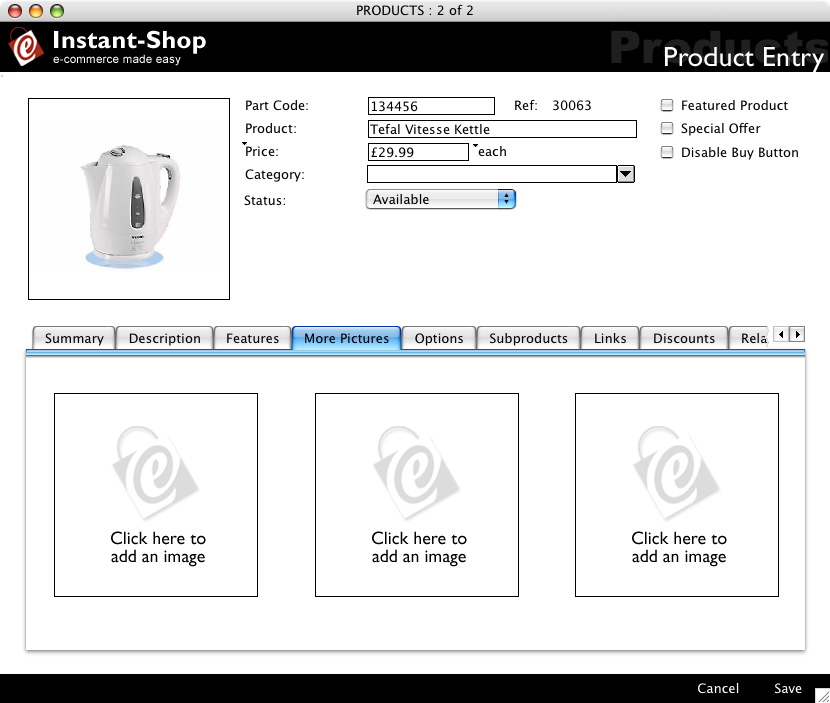
Adding a Pictures
To import a picture simply click on one of the picture areas and either paste a picture in from your clipboard or select 'Import Picture' from the 'Picture' menu to import a picture file from your hard disk.
Instant-Shop will accept a wide range of different picture formats including BMP, TIFF, JPEG and Photoshop files. The optimum size for a logo is 200 x 200 pixels. Instant-Shop will scale your graphic automatically to fit this size.
Removing a Picture
To remove a picture click on the picture that you want to remove and select 'Clear Picture' from the 'Picture' menu.
Instant-Shop™ User Manual