If the Instant-Shop is not being used with a static site then you will need somewhere to tell your customers about your company to show that there is something real behind the internet store! The About Us page will describe your company and can include up to 3 pictures.
To change the content of the About Us page select 'About Us' on the
'Options' menu from the Product Database screen.
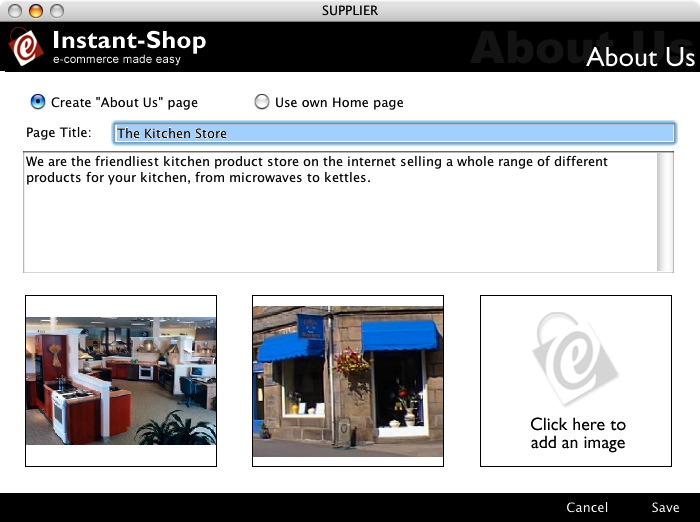
Create "About Us" Page
This radio button indicates that you want an about us page creating.
Page Title
This is the title for the main body of the introduction text. It should be use to very briefly introduce your company.
The main text area is for a more detailed text description about your company. This should be no more than 2-3 paragraphs in length.
Tip: If no text is entered Instant-Shop will mark the page as being under construction.
Pictures
To import a picture simply click on the required picture area and either paste a picture in from your clipboard or select 'Import Picture' from the 'Picture' menu to import a picture file from your hard disk.
Instant-Shop will accept a wide range of different picture formats including BMP, TIFF, JPEG and Photoshop files. The optimum size for a picture is 200 x 200 pixels. Instant-Shop will scale your graphic automatically to fit this size.
Use Home Page
If you have a home page already then you can link back to this site for the about us information. If you click this radio button the screen will change to allow you to enter a link.
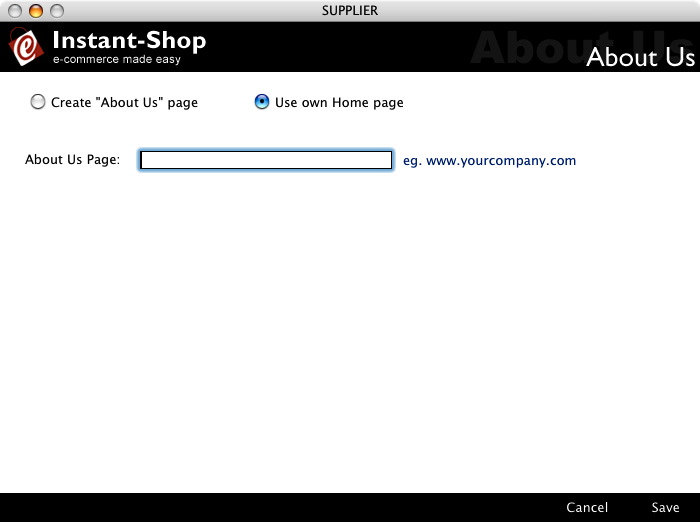
Simply enter the URL of the home page you want to link to.
Instant-Shop™ User Manual