Instant-Shop is by far the easiest way to get your ecommerce site up and running. It has been specifically designed with both the shop owner and the customer in mind to give them both the best shopping experience on the Internet.
To acheive this, the Instant-Shop system is made up of two parts:
Instant-Shop Application
The Instant-Shop application is a database that you maintain. It allows you to maintain your product catalogue (including pictures) and your web store. It also manages your customers and incoming orders in one easy to use application. The Instant-Shop application updates the server, mirroring the entire product database, in a single click.
Instant-Shop runs on a wide variety of operating systems : Windows 98 / ME / 2000 and XP, MacOS 9 and Mac OS X.
Instant-Shop Server
The Instant-Shop server is a database driven web server. It takes your products that have been uploaded and formats them into a catalogue that customers can browse and buy things from. Because the server is database driven, Instant-Shop will allow the customers to easily search for the products they are interested in. The server has specifically been designed to produce clearly laid out pages that are easy to navigate to make the customers buying experience as good as possible.
Instant-Shop is one of the most secure applications on the market. It features the latest security techniques so your customers can make their purchases with the upmost confidence.
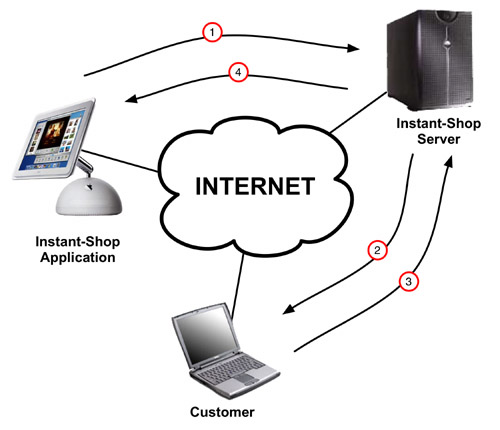
The Instant-Shop Process
1) The shop owner opens a shop online and uploads their products to the server. The shop owner can upload to their site as often as they like and can make as many changes as they need.
2) The server will produce your very own ecommerce enabled web site. When the customer logs on to your site they can find the products they are interested in and go through to purchase them. New items are added to their shopping basket.
3) Once the customer has selected all their items they can proceed to purchase them. Instant-Shop features a simple ordering process. When the order is complete it is sent to the server and the customer gets an easy understand order confirmation.
4) The shop owner is also notified that the customer has placed their order and can either view the orders securely online or if they are using Instant-Shop Pro they can download the order straight into the application.
Instant-Shop™ User Manual